Pages

Tampilkan postingan dengan label Aplikasi. Tampilkan semua postingan

Rabu, 02 April 2014

Start Menu Modifier

  Blend the Windows 8 modern UI with the desktop

 Start Menu Modifier is a desktop customization software that helps moving between Windows 8's desktop and tile interface a little less jarring.

One of the biggest problems that Windows 8 faces is its steep learning curve. Start Menu Modifier helps make this learning curve a bit more manageable by overlaying the tile interface on top the desktop. What Start Menu Modifier does is shrinks the tile interface to show up on the top of the bottom of the screen, making it wider and scrollable.

While Start Menu Modifier looks seamless and works well, it doesn't offer any advantage of the stock interface. The app doesn't give you a traditional start menu, like the Pokki app, so many users will be disappointed at that. Jumping in and out of the tiled interface is something that definitely takes some getting used to but offers a better, more useful view of all your apps and live tiles.

Start Menu Modifier has some bugs that need to be worked out as well. The application itself doesn't require any installation, which is good and bad. You'll have to find the folder it's located in to get into its options. During launch, there is a .NET Framework error, which can be ignored but makes the app feel incomplete. Start Menu Modifier also didn't keep our settings after shutdown or reboot, which is a major bummer.

Still, those who want a less jarring Windows 8 experience will want to give Start Menu Modifier a try ..

Pokki Start Menu App Receives Update on Windows – Free Download


                  Pokki works on both Windows 8 and 8.1
   Pokki is one of the apps that can bring back the old functionality in Windows, coming with a Start button and a fully-working Start Menu that makes the modern operating system looks just like Windows 7.

A new version released today comes to make things even better, fixing a number of bugs found in the app and improving the overall performance on all Windows versions.

As usual, SweetLabs, the company behind the whole project, hasn’t provided us with any release notes on this particular build, but expect Pokki 0.267.1.197 to focus especially on fixing glitches and other performance issues reported in older builds.

The application continues to offer support for both Windows 8 and 8.1, so you can download Pokki even if you’ve already made the move to Microsoft’s new operating system. Both 32- and 64-bit editions of the OS are supported...

 So you can download in http://pokki.en.softonic.com/download

Jumat, 13 Desember 2013

BlueStacks App Player for Windows 8


BlueStacks has built its solid reputation on providing software which enables Android apps to run on a variety of different platforms besides Google’s. With the Windows beta version released last year to some 5 million+ downloads and the OS X beta arriving just six weeks ago, the BlueStacks team has now compiled a version adapted to the relatively-new Windows 8 platform, as well as optimization for the Microsoft Surface Pro. Details after the break.
Running such apps on Windows and Mac is one thing, but in order to fully emulate the experience of using apps and playing games on an Android, it’s better to run an emulator tool like BlueStacks on a touch-based device. The Surface Pro, which is proving to be a popular device, having exhausted its initial batch of the 128GB storage configuration, would seem the perfect candidate for some BlueStacks treatment, and thanks to this new release from the Silicon Valley-based outfit, enjoying the three quarters of a million Android titles on Microsoft’s highly-anticipated slate.

It’s amazing to think that BlueStacks, as a company, is scarcely two years old, and yet in such a short space of time, has achieved so much. Millions have gone ahead and downloaded BlueStacks beta for Windows and Mac, and with this new version also catering to the swiftly-adopted Windows 8, I would expect that same trend to continue once more.
Intriguingly, the company also recently signed a distribution deal with a slew of PC OEMs to pre-load the BlueStacks software onto over 100 million PCs during the course of 2013. Considering Android’s already expansive reach in mobile space, the move will not only enhance the user base in terms of numbers, but it will mean Android developers need not port apps separately for the Windows platform.


 Having given the beta a whirl on my Mac back when I covered it in December, I have to say, I was very impressed by the responsiveness, and general smoothness of the whole experience. If it is half as good on the Surface Pro as it has been so far at desktop level, it’s fair to say BlueStacks could be a game-changer in terms of how we deal with cross-platform experiences. You can download BlueStacks for Windows 8 from
Alternative BlueStacks App Player download from external server (availability not guaranteed)

BlueStacks App Player 0.8.2.3018 Beta

All your favorite Android apps now on your PC
If you've ever wished you could test out Android apps before installing them on your device or just want to use the same apps on both your Android device and your computer, check out the free BlueStacks App Player.

BlueStacks App Player 0.8.2.3018 Beta - Key details

BlueStacks App Player screenshot
User Rating: 4.0 (214 votes)
  • Currently 4.05/5
  • 1
  • 2
  • 3
  • 4
  • 5
License: Freeware
Price: FREE
File Size: 3.70 MB
Released: Nov 26, 2013
Downloads: Total: 22156 | This Week: 1919
Keywords: android, android market, AndroidMarket, angry birds, AngryBirds, app, app player, application, bluestacks, Cloud Connect, CloudConnect, desktop, play
Author: BlueStacks
Author URL: http://www.bluestacks.com

BlueStacks App Player x32 BlueStacks App Player x64
- See more at: http://www.windows8downloads.com/win8-bluestacks-app-player-gvrldstm/#sthash.56TO8Y1Q.dpuf

Selasa, 03 Desember 2013

iTunes 11.1.3 (32-Bit)

iTunes is an audio and video player that lets you manage your iOS devices as well as download content from the iTunes store.
iTunes 11 has been completely redesigned from the ground up. Development of iTunes has been stagnant the last few years so Apple needs to get this one right. Has Apple nailed it or is the new iTunes a mess? Read on to find out.


Features
The interface of iTunes has been completely re-imagined. Everything is simpler and space is better utilized. In the previous version of iTunes, there was a persistent bar on the left where you can access playlists, albums, devices, and more. While it provided quick access to those features, most users didn't use them most of the time. Apple has scrapped this and has made the default album view take up the entire window. iCloud integration has also been tightened. Every track you've bought in iTunes will now show up in your music library, whether or not it has been downloaded. Click on it to download the album. User can now also stream directly from the cloud instead of having to download the track first. This also applies to all your TV and movies that were purchased in iTunes. There's also a dedicated tab for iTunes Match, Apple's music matching service to make all of your tracks available across devices, if they're available in the iTunes store.
The iTunes store has also gone through a redesign with featured content up top. Top lists are still there and are easier to browse. iTunes 11 will also allow you to access the iTunes store content from your music library, suggesting similar artists and tracks, without having to take you to the iTunes store.

Usability


Browsing by album is a pleasure. Click on an album and the tracks will show up below. iTunes also analyzes the color of album artwork to create a colored background for each individual album. It works well for the most part but the effect blurs the album art around the edges. New in iTunes 11 is the "Up Next" feature, which is basically a fancy name for your queue. Add songs to your queue from wherever you are in the interface. You don't need to manage a playlist to arrange and rearrange the tracks to your liking.
Creating playlists is much improved. Instead of having to jump in and out a playlist to add and arrange tracks, playlists now have a dedicated pane on the right where you can manipulate tracks without having to jump around the program.
The mini player has also been completely redesigned and is actually useful now. The mini player has gotten smaller but utilizes that small space much better than previous versions. Player controls will show up with you hover your mouse over the mini player. There's access to search and your Up Next queue can be manipulated from the mini player.
Devices now show up as a button at the top right. Clicking on it will take you to a detailed page where you can manage everything. Choose what you want synced, manage your apps, and even play music directly from your iOS device. Everything is easier to read and comprehend in the device tab.

Quality


The only thing missing from iTunes 11 is a music streaming service. iCloud gives users the ability to download tracks locally but not stream them. There is no subscription service in iTunes to compete with the likes of Spotify, Rdio, and Xbox Music. It's only matter of time before Apple releases its own music subscription service but it's disappointing that Apple didn't release it with iTunes 11.

Conclusion


iTunes is still one of the best media players around. It has gotten easier to use, feels less bloated, but is still missing a music subscription service.

link >>  If the download doesn't start automatically, click here

KMPlayer


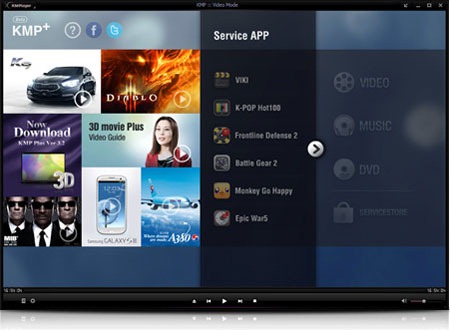
KMPlayer adalah media player serbaguna yang dapat mencakup berbagai jenis format kontainer seperti VCD, DVD, AVI, MKV, Ogg Theora, OGM, 3GP, MPEG-1/2/4, WMV, RealMedia, dan QuickTime. Aplikasi ini dapat menangani berbagai macam subtitle dan memungkinkan Anda untuk menangkap audio, video, dan screenshot dalam banyak cara.
Program ini menyediakan filter internal dan eksternal dengan lingkungan yang terkendali penuh dalam hal koneksi ke splitter lain, Decoder, audio/ video filter dan mengubah renderers tanpa bermasalah dengan merit system DirectShow. Filter internal tidak terdaftar untuk sistem pengguna agar tidak menjadi kacau dengan filter sistem.
Pada bulan Desember 2008 KMPlayer dibeli oleh Pandora.tv, dan terus dibuat tersedia sebagai freeware.
               
Download KMPlayer untukmu sekarang juga !
link >>  Alternative KMPlayer download from external server (availability not guaranteed)

Aurora 3D Animation Maker 1.34.2

Aurora 3D Animation Maker
   Aurora 3D Animation Maker 1.34.2

(10) 3.85
   Aurora 3D Animation Maker is the easy-to-use 3D title animation software that will let you create beautiful 3D animations that will take your text or logos to a whole new level of awesomeness! Using just a single timeline, you'll be able to control all aspects of your animation, including the length and the speed of the animation! Incorporating your animations into your website, or video editing software, is easier than ever with the option to export as MOVs, animated GIFs, or as a sequence of images!
What's New
Version 1.34.2:
  • Fixed a bug for compatibility with OS X 10.9

Requirements
  • Intel, 64-bit processor
  • OS X 10.6.8 or later


link >>  Alternative Aurora 3D Text & Logo Maker download from external server (availability not guaranteed)

Selasa, 26 November 2013

GOM Player 2.1.28.5039 Gratis Download Free

Minggu, 30 Januari 2011


GOM adalah GRATIS aplikasi media player, yang memungkinkan Anda untuk memutar file media pada komputer Anda. Apa yang membedakannya dari perkakas semacam itu adalah bahwa ia datang dengan built-in codec untuk audio yang paling populer dan format video.
GOM Media Player Fitur:

Codec Finder
GOM Player mencakup banyak codec (XviD, DivX, FLV1, AC3, OGG, MP4, H263 dan banyak lagi) sehingga Anda tidak perlu menginstal codec terpisah untuk video yang paling. Bagi mereka yang membutuhkan video codec yang terpisah, GOM Player akan menemukan satu dan mengarahkan anda ke suatu tempat di mana Anda dapat men-download versi open source codec. Dengan begitu, Anda tidak akan terjebak dengan codec yang tidak perlu pada sistem anda.

Play Broken AVI Files (Dipatenkan)
AVI file tidak dapat dimainkan jika indeks rusak, atau jika file tersebut tidak sepenuhnya didownload. Hal ini karena indeks terletak pada akhir file. teknologi yang dipatenkan GOM Player memungkinkan pengguna untuk melihat file dengan indeks rusak atau yang masih sedang didownload.

Powerfull Subtitle Dukungan
GOM Player mendukung SMI, SRT, RT, SUB (dengan BEI) file untuk subjudul. Anda dapat menentukan margin, lokasi, ukuran, resolusi, font dan lain-lain. Anda juga dapat mengaktifkan bayangan, melihat file ASF dengan subtitle, karaoke subtitle mode. Anda bahkan dapat menyinkronkan subtitle dan video jika ada ketidakcocokan apapun.

Nyaman Playlist
Jika Anda menjalankan file video dan sudah ada file dengan nama yang sama di direktori, maka akan secara otomatis ditambahkan ke daftar putar Anda. GOM Player memiliki format yang sama seperti playlist M3U, PLS, ASX dan Anda juga dapat memasukkan dan mengedit format media yang berbeda di playlist yang juga. Sangat mudah untuk membuat dan mengedit playlist multimedia anda sendiri dengan GOM Player.

Dukungan Berbeda Jenis Media
Seiring dengan format media yang berbeda seperti AVI, MPG, MPEG dan DAT, GOM Player juga mendukung streaming Windows media format (WMV, ASF, ASX). Anda juga dapat menonton video berkualitas DVD dengan 5.1 channel audio output.

Screen Capture
Screen capture memungkinkan Anda untuk mengambil screenshot video Anda langsung dari GOM Player. Menggunakan fitur Burst Capture, Anda dapat mengambil screenshot terus naik hingga 999 tembakan.

Fitur Lanjutan
Ada banyak fitur-fitur canggih tak terbatas. Menyesuaikan kecerahan, kontras dan saturasi. Mempertajam dan menambahkan suara ke video Anda. Coba equalizer audio. Ulangi bagian video Anda dengan fitur Ulangi kami AB. Maju / mundur beberapa detik menggunakan kiri / kanan tombol. Dan banyak lagi bagi Anda untuk menemukan!

Persyaratan Sistem
Microsoft Windows 98SE, Me, 2000, XP, 2003, Vista atau Windows 7
Intel-compatible CPU P3 atau lebih Minimum RAM yang direkomendasikan oleh sistem operasi yang digunakan 20 MB Hard Drive Space.
Beberapa video mungkin memerlukan versi terbaru dari DirectX atau Windows Media Player.
Fitur pengaturan dapat berubah sesuai dengan berbagai jenis file video.
Ubah 'Deadlock masalah' kadang-kadang terjadi ketika Anda mematikan pemain.
Meningkatkan kinerja Vorbis audio decoder.


Gratis Download GOM Player 2.1.28.5039 Free